






LOADTRONIK
LD1-G MANUAL (test_01)
& USER'S GUIDE



1. PRODUCT OVERVIEW
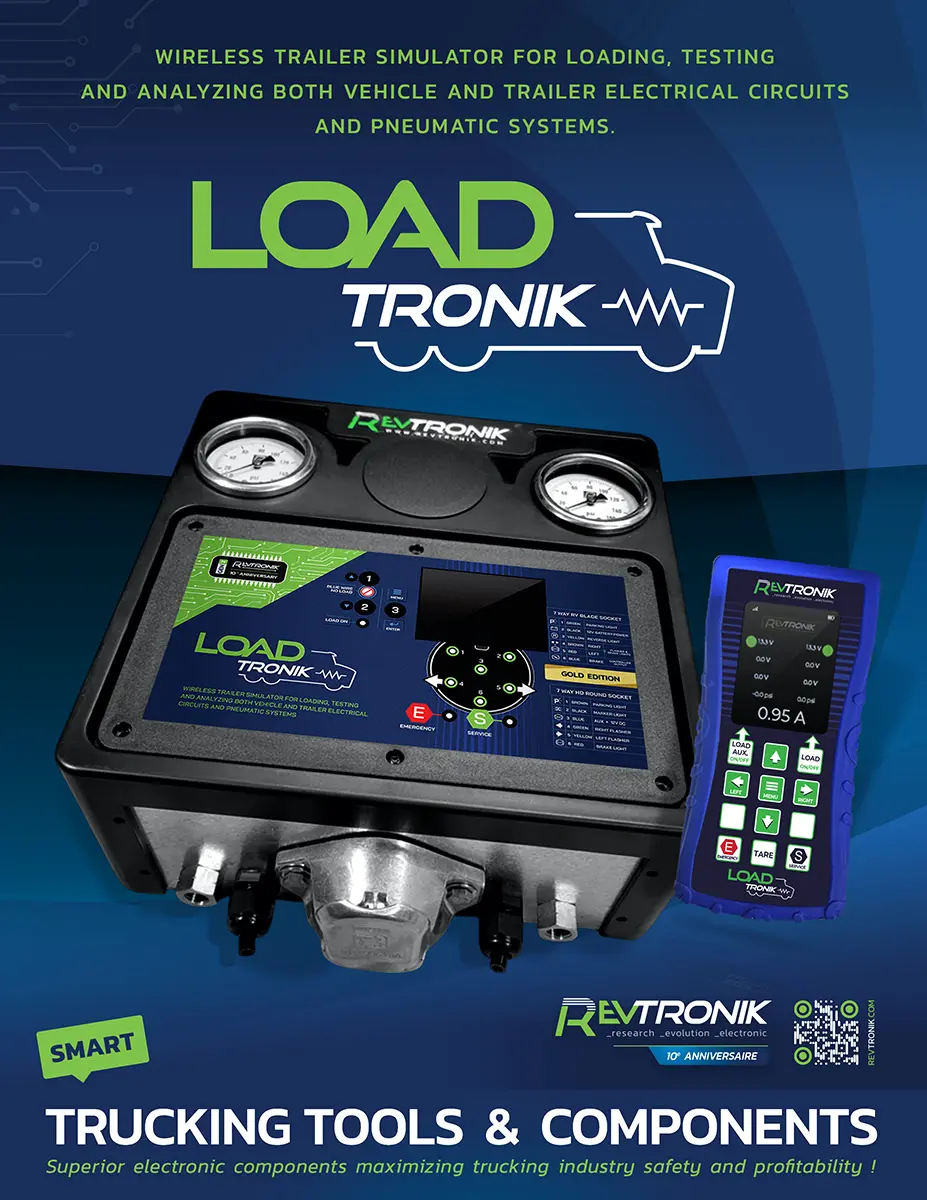
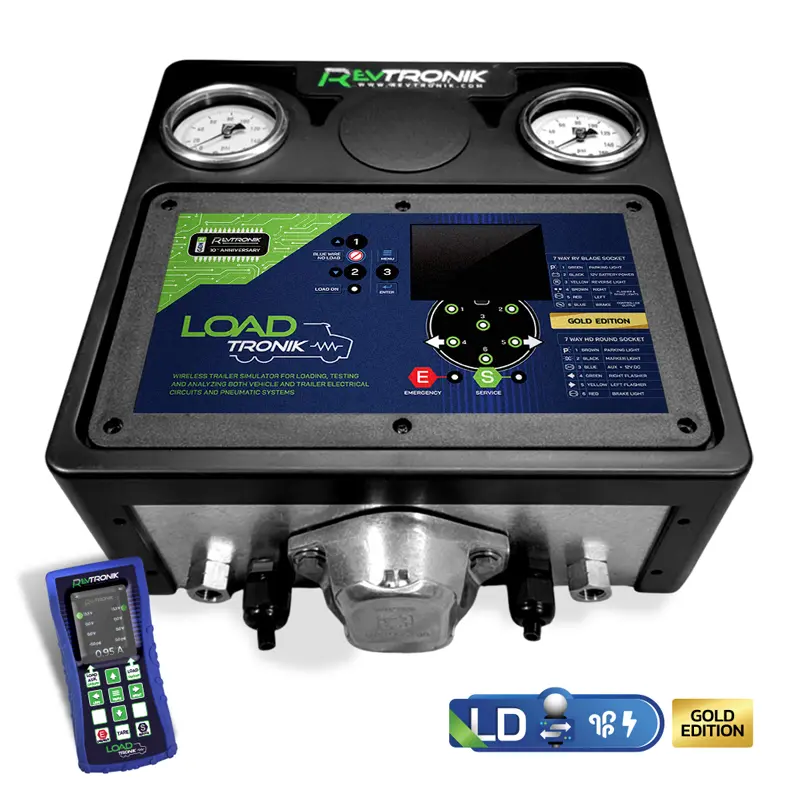
The LoadTRONIK LT1-G (Gold Edition) is Revtronik's top-of-the-line wireless trailer simulator, engineered for commercial trucking maintenance shops, fleet operations, and independent owner-operators across North America. It enables a single technician to fully simulate a trailer load, diagnose electrical and pneumatic circuits, and obtain real-time data — all without requiring an actual trailer to be connected.
Certified to North American heavy-duty vehicle wiring standards, the LT1-G supports both the 7-pin round SAE J560 receptacle (tractor-trailer / semi / 18-wheeler) and the 7-pin flat connector used on domestic trailers, in addition to 4- and 5-pin tow adapters for light-duty applications.
Unlike lower-tier diagnostic tools, the LT1-G can also be installed in series between the tractor and the trailer simultaneously, making it a bi-directional diagnostic platform. The integrated full-colour LCD screen and the companion wireless remote allow the technician to read voltage, amperage, and air pressure data in the palm of their hand from any position around the rig.
| KEY CAPABILITIES | EDITIONS & VARIANTS |
|
DUAL ELECTRIC & PNEUMATIC
SOLO ELECTRIC ONLY OTHER MODELS IN THIS LINE: |
2. TECHNICAL SPECIFICATIONS
| Model SKU | LD1-G (Cart version: LD1-GC) |
| Edition | GOLD — Dual Electric & Pneumatic |
| Wireless Remote | Included — full remote with onboard LCD display |
| Electrical Load Simulation | ≈ 8 Amps (constant overload mode) |
| Voltage Measurement | Per circuit, real-time, accurate to ±0.1 V |
| Current Measurement | Real-time, accurate to ±1.0 A |
| Display | Full-colour LCD (unit + remote) |
| Overload Protection | Automatic 10-minute cutoff with safety shutdown |
| Connector — Heavy Trailer | 7-Pin Round Receptacle (SAE J560 — standard N. American tractor-trailer) |
| Connector — Domestic Trailer | 7-Pin Flat Receptacle |
| Adapters Supported | 4-pin flat, 5-pin round tow adapters (optional) |
| Pneumatic Gauges | Dual: Emergency (parking brake supply) + Service (foot brake) |
| Air Hands (Gladhands) | Red (Emergency) + Blue (Service) — industry-standard color coding |
| Air Leak Test Reference | Normal: ≤ 3 PSI/min | Minor: 4–6 PSI/min | Major: > 6 PSI/min |
| In-Series Operation | Supported — simultaneous tractor + trailer diagnostics |
| External Power Input | Optional adapters available (battery, automotive socket, shore power) |
| Warranty — Unit | 12 months from date of purchase |
| Warranty — External Components | 90 days from date of purchase |
| Product Page | revtronik.com/loadtronik |
3. BOX CONTENTS & CONNECTOR REFERENCE
3.1 STANDARD BOX CONTENTS
The following items are included with the LD1-G (unit only). The LD1-GC cart variant ships with the unit pre-mounted on a service cart — no additional assembly is required.
-
- 1 × LoadTRONIK LD1-G Main Unit
- 1 × Wireless Remote Control with full-colour LCD display
- 1 × 7-Pin Round Electrical Cable (SAE J560 — heavy trailer / tractor-trailer side)
- 1 × 7-Pin Flat Electrical Connector (domestic trailer side)
- 1 × Red Gladhand (Emergency air line connection)
- 1 × Blue Gladhand (Service air line connection)
- 1 × Emergency pneumatic air hose
- 1 × Service pneumatic air hose
- 1 × Quick-reference card
Optional accessories and replacement parts are available separately on the LoadTRONIK product page:
-
- 4-pin flat and 5-pin round tow adapters
- External power supply adapters (battery terminals, automotive socket)
- Replacement gladhands, electrical cables, and pneumatic hoses.
3.2 CONNECTOR IDENTIFICATION
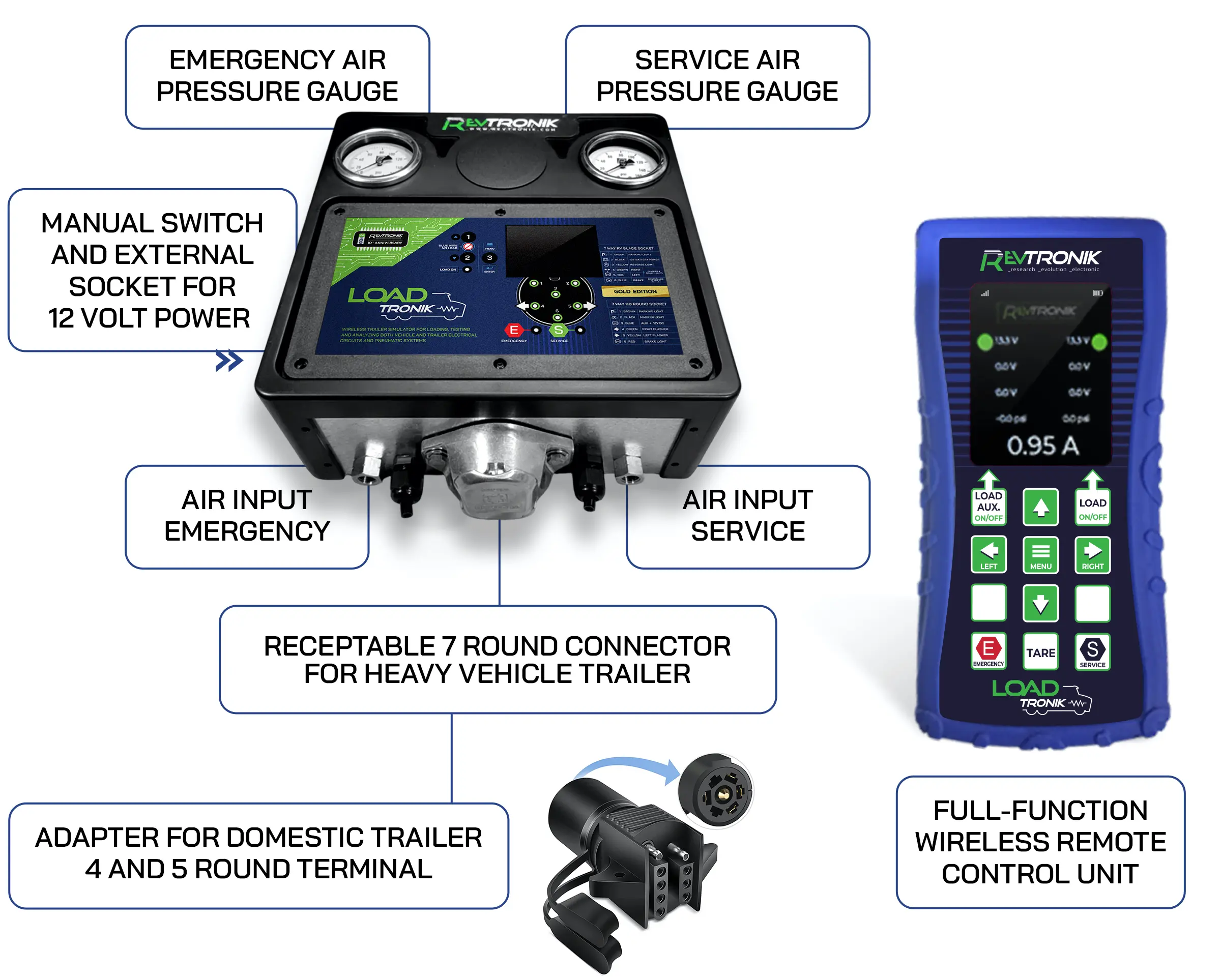
The LD1-G is equipped with two electrical receptacles to accommodate the full range of North American trailer configurations:
-
- 7-Pin Round Receptacle (SAE J560) — Used with semi-trailers, flatbeds, and most heavy-duty commercial trailers. This is the industry-standard connector for Class 6–8 vehicles across North America.
- 7-Pin Flat Receptacle — Used with domestic (light-duty) trailers such as utility, boat, livestock, and recreational trailers.
- 4-pin / 5-pin Tow Adapters (optional) — Available separately; allow the LD1-G to interface with light-duty tow vehicles equipped with standard 4-way or 5-way flat connectors.
4. CONTROL PANEL & INDICATOR REFERENCE
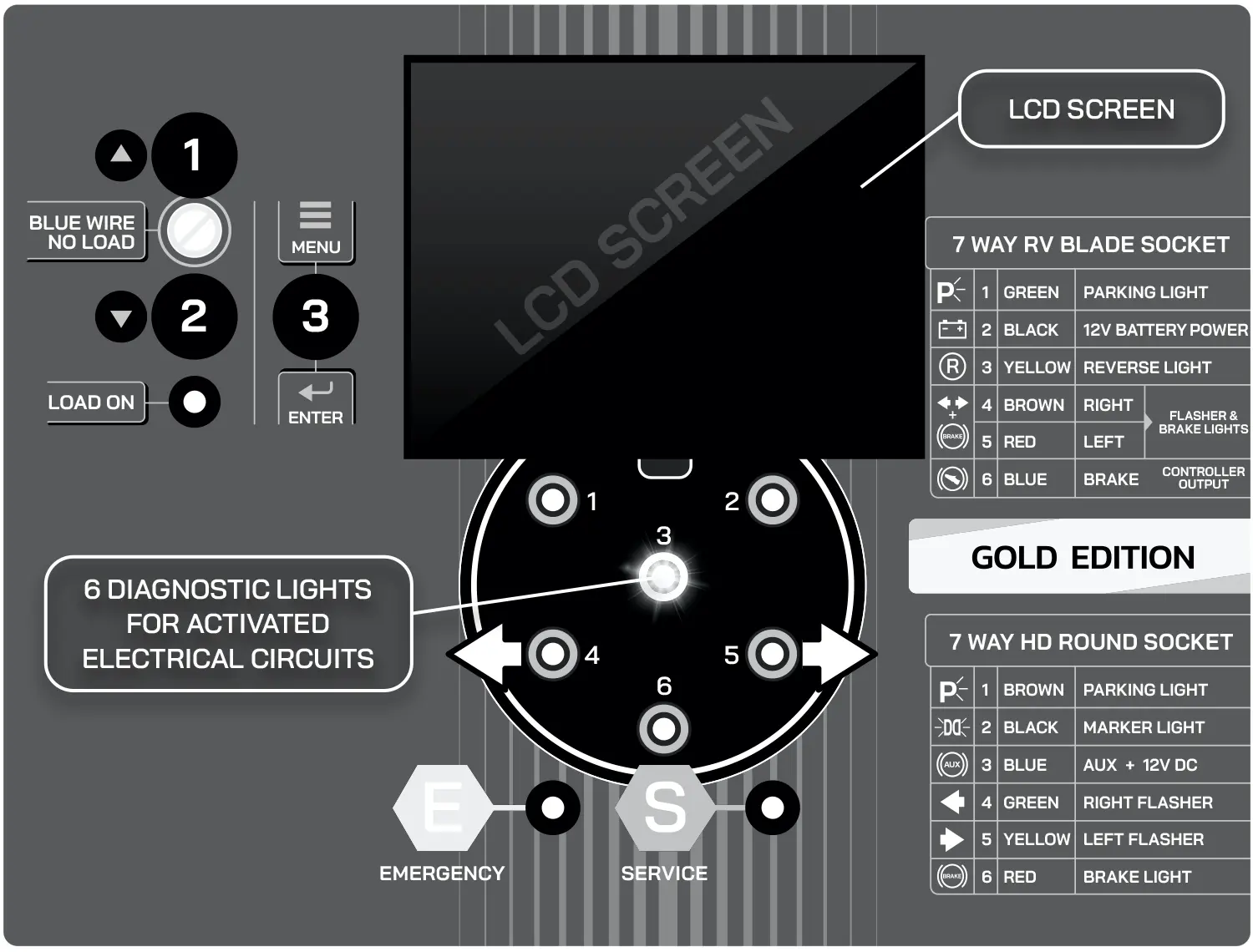
The LoadTRONIK LD1-G features an integrated control panel with dedicated buttons and LED indicators. The following tables detail every control and indicator visible on the unit, organized by connector type.
4.1 CONTROL BUTTONS
| Button | Label | Function | Operating Note |
| Button 1 (Up ▲) | Overload OFF (Blue) | Activates / deactivates the current overload on the BLUE wire only. Also serves as the UP navigation button for the LCD menu. | When this overload is OFF, the blue wire voltage powers only the display — no current draw is added to the circuit. Use this to isolate blue wire power quality before enabling the full overload. |
| Button 2 (Down ▼) | Overload ALL | Activates / deactivates the current overload across all active electrical circuits. Also serves as the DOWN navigation button for the LCD menu. | Enabling this function adds approximately 8 amps of simulated trailer load to the activated circuits. Monitor voltage and current readings carefully after activation. |
| Button 3 (Enter ●) | MENU / ENTER | Enters the LCD screen menu or confirms a selection. | Refer to Section 7 for LCD screen navigation details. |
4.2 LED INDICATORS — 7-PIN ROUND RECEPTACLE (HEAVY TRAILER / SEMI)
| Connector | Circuit / Pin | Signal | Indicator Logic |
| 7-Pin Round | Pin 1 — Yellow | Left Turn Signal | LED illuminates when voltage is present on the left turn circuit. |
| 7-Pin Round | Pin 2 — Red | Brake / Tail Light (Right) | LED illuminates when voltage is present on the brake/tail circuit. |
| 7-Pin Round | Pin 3 — Green | Right Turn Signal | LED illuminates when voltage is present on the right turn circuit. |
| 7-Pin Round | Pin 4 — Black / Ground | Ground | Reference ground — no dedicated LED. |
| 7-Pin Round | Pin 5 — Brown | Tail / Running / Marker Lights | LED illuminates when voltage is present on the tail light circuit. |
| 7-Pin Round | Pin 6 — Blue | Electric Brake / Auxiliary Power | LED illuminates when voltage is present. This wire is also used to power the LCD display when no overload is active on Button 1. |
| 7-Pin Round | Pin 7 — White | Reverse Lights / Backup | LED illuminates when voltage is present on the reverse light circuit. |
4.3 LED INDICATORS — 7-PIN FLAT RECEPTACLE (DOMESTIC TRAILER)
| Connector | Circuit / Pin | Signal | Indicator Logic |
| 7-Pin Flat | Pin A — White | Ground | Reference ground — no dedicated LED. |
| 7-Pin Flat | Pin B — Brown | Tail / Running / Marker Lights | LED illuminates when voltage is present. |
| 7-Pin Flat | Pin C — Yellow | Left Turn Signal + Brake Light | LED illuminates when voltage is present on the combined left turn/brake circuit. |
| 7-Pin Flat | Pin D — Green | Right Turn Signal + Brake Light (combined) | LED illuminates when voltage is present. |
| 7-Pin Flat | Pin E — Blue | Electric Brake | LED illuminates when voltage is present on the electric brake circuit. |
| 7-Pin Flat | Pin F — Black | 12V Auxiliary Power | LED illuminates when 12V accessory power is present. |
| 7-Pin Flat | Pin G — Purple | Backup / Reverse Light | LED illuminates when voltage is present on the reverse circuit. |
5. POWERING ON THE DISPLAY
The LoadTRONIK LD1-G display is designed to activate automatically when it receives power from the connected vehicle. The specific power-on procedure depends on the connector type in use.
5.1 VIA 7-PIN ROUND RECEPTACLE (SAE J560 — HEAVY TRAILER)
Per North American Class 6–8 vehicle standards (FMCSS 393.25 / SAE J1067), the blue wire (Pin 6) must carry a constant voltage whenever the ignition is in the ON position or the engine is running. To power the display:
-
- Turn the vehicle ignition key to the ON position, or start the engine.
- The blue wire should immediately supply voltage to the LoadTRONIK, and the LCD display will illuminate.
- If the display does not illuminate, verify that the blue wire is properly energized. A switched blue wire (controlled via an in-cab toggle) is non-compliant with industry standards but is common in the field — if present, activate the switch first.
 REGULATORY NOTE: A blue wire that is not continuously powered with the ignition ON is technically non-compliant with standard SAE J1067 / FMCSS 393. This is a common inspection finding during roadside compliance checks (CVSA) and PMI inspections.
5.2 VIA 7-PIN FLAT RECEPTACLE OR 4/5-PIN TOW ADAPTERS
Light-duty vehicles using flat or round tow adapters may not energize the blue wire when the ignition is on. In this configuration, power the display from the parking/running lights (brown wire):
-
- Connect the LoadTRONIK to the vehicle using the appropriate adapter.
- Activate the vehicle's parking lights or running lights.
- The display will illuminate from the brown (tail light) wire. Be aware that with this method, the current draw simulation will be shared between the brown wire and any other circuits you subsequently activate.
5.3 EXTERNAL POWER SUPPLY
The LoadTRONIK display can also be powered independently from an external source — a dedicated vehicle battery, an auxiliary battery pack, or an automotive 12V accessory outlet — using the optional external power adapters (sold separately). When using an external power supply:
-
- The external power feeds only the display — it does not contribute to or interfere with the vehicle electrical diagnostic circuit.
- Voltage readings remain accurate and fully isolated from the external supply.
- This method is recommended when diagnosing vehicles with severely degraded wiring, where consistent display power cannot be guaranteed from the vehicle's own circuits.
6. OPERATING THE ELECTRICAL OVERLOAD
The electrical overload function is the core diagnostic feature of the LoadTRONIK LD1-G. It simulates the current draw of an actual trailer (~8 amps) on any activated circuit, allowing technicians to identify voltage drop, resistance problems, poor ground connections, corroded terminals, and undersized or damaged wiring under real operating load conditions.
6.1 BLUE WIRE OVERLOAD (BUTTON 1)
By default, the blue wire (Pin 6) energizes the display without adding current load to the blue circuit. This is the factory default state and is indicated by the Blue Wire 'No Load' LED being illuminated.
To evaluate the blue wire's capacity to sustain a current load:
-
- Press Button 1 to deactivate the 'No Load' mode. This will remove the isolated power path and put the display draw onto the blue circuit itself.
- Observe the voltage reading on the display. A significant voltage drop at this stage indicates a compromised blue wire circuit — check connections, terminals, and wiring for corrosion or excessive resistance.
- Proceed to step 6.2 to add the full overload.
6.2 FULL CIRCUIT OVERLOAD (BUTTON 2)
With one or more circuits activated on the vehicle:
-
- Press Button 2 to engage the current overload simulation (~8 A).
- Monitor the voltage and current readings on the LCD display in real time.
- A significant voltage drop (more than 0.5–1.0 V) under load is an indicator of connection resistance issues — corrosion, loose terminals, damaged wiring, or an undersized ground path.
- Test each circuit individually by activating one function at a time (e.g., left turn, brake lights, running lights) while observing the readings.
6.3 AUTOMATIC SAFETY SHUTDOWN — 10-MINUTE OVERLOAD TIMER
SAFETY LIMIT: The overload function will automatically disengage after 10 consecutive minutes of continuous operation. This is a built-in thermal protection feature.
When the 10-minute limit is reached, the power indicator LED will flash to alert the technician, and the overload will disengage automatically. To resume testing:
-
- Deactivate the circuit currently in use (turn off the function on the vehicle side).
- Reactivate the circuit to reset the timer.
FIRE HAZARD WARNING: Prolonged continuous overload operation can cause internal components to overheat. Never leave the device unattended while the overload is active. Do not place the unit on or near flammable materials during operation.
7. LCD SCREEN DIAGNOSTICS
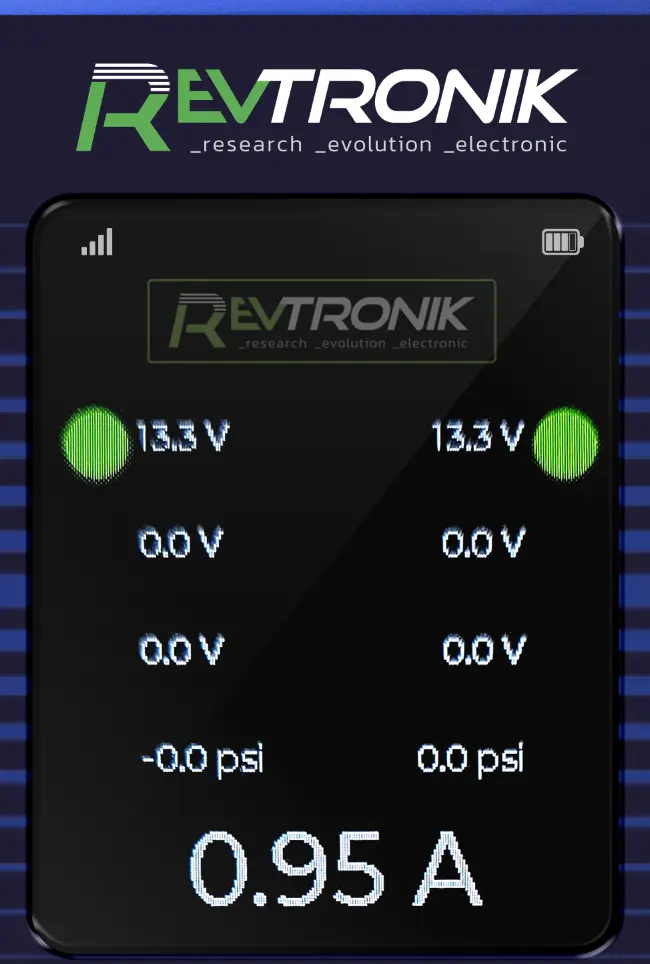
The full-colour LCD screen on both the unit and the wireless remote provides real-time visibility into the electrical health of every connected circuit simultaneously. This eliminates the need to use a multimeter and allows rapid identification of voltage leakage, poor connections, and intermittent faults.
7.1 READING VOLTAGE AND CURRENT
The screen displays both voltage (V) and amperage (A) for each active circuit. The display mode (voltage or current) is indicated by the corresponding LED on the control panel. Both values can be viewed simultaneously — a key advantage of the Silver and Gold editions over the Bronze model.
7.2 STATUS DOT COLOUR CODES
A coloured dot appears beside each activated circuit on the LCD screen. These dots communicate the health of the circuit at a glance:
| Dot Colour | Voltage Range / Condition | Meaning | Recommended Action |
 Green Green |
11.0 V – 14.5 V | Circuit is active and within normal operating voltage range. | No action required. Circuit is healthy. |
 Yellow Yellow |
Below 11.0 V | Circuit is active but voltage is below acceptable threshold. Indicates voltage drop under load. | Inspect wiring, connections, and ground path. Check for corroded terminals or damaged conductors. |
 White White |
Intermittent / Fluctuating | Represents a non-constant voltage — typically a turn signal or other pulsing circuit. The display shows both the minimum and maximum average voltage values of the on/off cycle. | Normal for turn signals. Investigate other circuits displaying white if intermittency is unexpected. |
7.3 DETECTING VOLTAGE LEAKAGE
The LCD screen can detect low-level voltage presence on circuits that are nominally off. If a circuit you have not activated shows a non-zero voltage reading, this indicates a voltage bleed — potentially caused by a short to another circuit, damaged insulation, or a corroded connector creating a resistance bridge. The LED indicators alone may not catch these faults, but the LCD screen will detect them reliably.
8. PNEUMATIC PRESSURE TESTING
 CRITICAL SAFETY REQUIREMENT: WHEEL CHOCKS MUST BE INSTALLED UNDER THE DRIVE AND TRAILER TIRES BEFORE PERFORMING ANY PNEUMATIC TESTS. Activating the pneumatic circuits can release or apply brake pressure. Failure to chock wheels may result in unintended vehicle movement and serious injury or death.
8.1 GLADHAND CONNECTION PROCEDURE
The LoadTRONIK LD1-G is equipped with two gladhand (air hand) couplings — one red (Emergency) and one blue (Service) — matching the industry-standard color coding used on all North American Class 6–8 tractors and trailers.
-
- Ensure the vehicle is parked with the parking brake applied and wheels chocked.
- Connect the red gladhand from the LoadTRONIK to the red (Emergency) gladhand receptacle on the rear of the tractor.
- Connect the blue gladhand from the LoadTRONIK to the blue (Service) gladhand receptacle on the rear of the tractor.
- The two pneumatic dial gauges on the LoadTRONIK will immediately begin displaying the air pressure in each circuit.
8.2 READING THE PNEUMATIC GAUGES
The LoadTRONIK features two dedicated analog pressure gauges:
-
- Emergency Gauge — Displays the supply-line pressure sent from the tractor to disengage the trailer spring (parking) brakes. This line must maintain adequate pressure for the trailer brakes to remain released.
- Service Gauge — Displays the control-line pressure delivered by the tractor's foot brake valve or the hand valve, representing the actual braking force commanded by the driver.
These readings allow you to verify that the pressure seen on the tractor's dashboard gauges accurately reflects the pressure that would actually reach the trailer. Manual valves, brake deactivation valves, and damaged air lines can create restrictions that result in significant discrepancies.
8.3 AIR LEAK TEST PROCEDURE
The LoadTRONIK can be used in place of an actual trailer to perform a complete air leak test on the tractor's rear air supply system. Build system pressure to operating level, then monitor the gauge drop over time:
| Leak Rate | PSI Drop per Minute | Classification | Regulatory Note |
| Normal | ≤ 3 PSI / min | Acceptable — system is within service limits. | Vehicle is safe to operate under current brake air supply standards. |
| Minor Leak | 4 – 6 PSI / min | Marginal — schedule inspection and repair. | Vehicle may still be operated but a brake system inspection is required before the next major trip. |
| Major Leak | > 6 PSI / min | Out of service — immediate repair required. | Vehicle must not be returned to service. This exceeds FMCSS Part 393 / CVSA brake inspection thresholds. |
8.4 DIGITAL PRESSURE READING
In addition to the analog gauges, the LoadTRONIK's LCD screen and wireless remote display provide digital pressure readings for increased precision, particularly when comparing small pressure differentials between the tractor supply and a known trailer baseline.
9. SERIES CONNECTION — ELECTRICAL MODE 
One of the most powerful diagnostic capabilities exclusive to the Gold Edition is the ability to connect the LoadTRONIK LD1-G in series — that is, between the tractor and the trailer simultaneously. In this configuration, the device functions as a transparent electrical bridge that passes all signals through while monitoring voltage and current on every circuit in real time.
9.1 CONNECTION PROCEDURE — ELECTRICAL SERIES
-
- Connect the vehicle-side electrical cable from the tractor's 7-pin outlet to the LoadTRONIK's vehicle-side input receptacle.
- Connect the LoadTRONIK's trailer-side output receptacle to the trailer's 7-pin electrical inlet.
- All electrical circuits now pass through the LD1-G, and the LCD display (and wireless remote) will show the voltage and current on each active circuit in real time.
9.2 DIAGNOSTIC WORKFLOW — SERIES ELECTRICAL
The series electrical connection enables the following advanced diagnostic procedures, which are not possible with a standard multimeter approach:
-
- Live voltage and current monitoring on each circuit under actual trailer load — no spliced wires, no bypass leads, no open connectors required.
- Unplug and reconnect the trailer while observing the vehicle's electrical response. Watch for voltage spikes, drops, or faults that appear only when trailer impedance is introduced.
- Use the overload function with the trailer connected to amplify the total current draw and stress-test the tractor's wiring and connector quality under maximum load.
- Isolate intermittent faults: if a fault is present with the trailer but disappears when only the LoadTRONIK is connected (even with overload active), the fault is in the trailer wiring — not the tractor. This saves significant diagnostic time on difficult intermittent electrical complaints.
10. SERIES CONNECTION — PNEUMATIC MODE
CRITICAL SAFETY REQUIREMENT: WHEEL CHOCKS MUST BE IN PLACE UNDER ALL TIRES BEFORE INITIATING ANY PNEUMATIC SERIES TEST. Remote activation of the emergency or service brake circuits will directly affect brake application and release.
In pneumatic series mode, the LD1-G connects between the tractor and trailer air supply circuits. This allows the technician to not only monitor real-time air pressure at the trailer coupling point, but also remotely control brake application and release via the wireless remote — enabling a full brake adjustment and inspection workflow with a single technician.
10.1 CONNECTION PROCEDURE — PNEUMATIC SERIES
-
- Chock all wheels.
- Connect the tractor's rear red (Emergency) gladhand to the LoadTRONIK's vehicle-side red gladhand inlet.
- Connect the tractor's rear blue (Service) gladhand to the LoadTRONIK's vehicle-side blue gladhand inlet.
- Connect the LoadTRONIK's trailer-side red and blue gladhand outlets to the trailer's corresponding gladhand inlets.
- All air supply now flows through the LoadTRONIK, and pressure is visible on both the analog gauges and the digital displays (unit screen + remote).
10.2 REMOTE BRAKE CONTROL IN PNEUMATIC SERIES MODE
With the LD1-G connected in pneumatic series, the wireless remote allows the technician to:
-
- Remotely activate the Emergency brake circuit — releases the spring (parking) brakes on the trailer.
- Remotely activate the Service brake circuit — applies the service brakes on the trailer, allowing direct observation of brake chamber stroke and slack adjuster movement from underneath the trailer.
This capability allows a single technician to perform a full brake stroke inspection without a second person in the cab. The remote control provides live pressure readings at the same time as the brakes are being activated, allowing precise measurement of actual chamber actuation pressure.
IMPORTANT: When operating in pneumatic series mode, it is strongly recommended to use an external power supply (optional adapter) for the LoadTRONIK display. This protects against display loss if the vehicle's electrical quality deteriorates — and prevents the electrically-controlled pneumatic valves from closing unexpectedly, which could result in uncontrolled brake actuation.
11. WIRELESS REMOTE CONTROL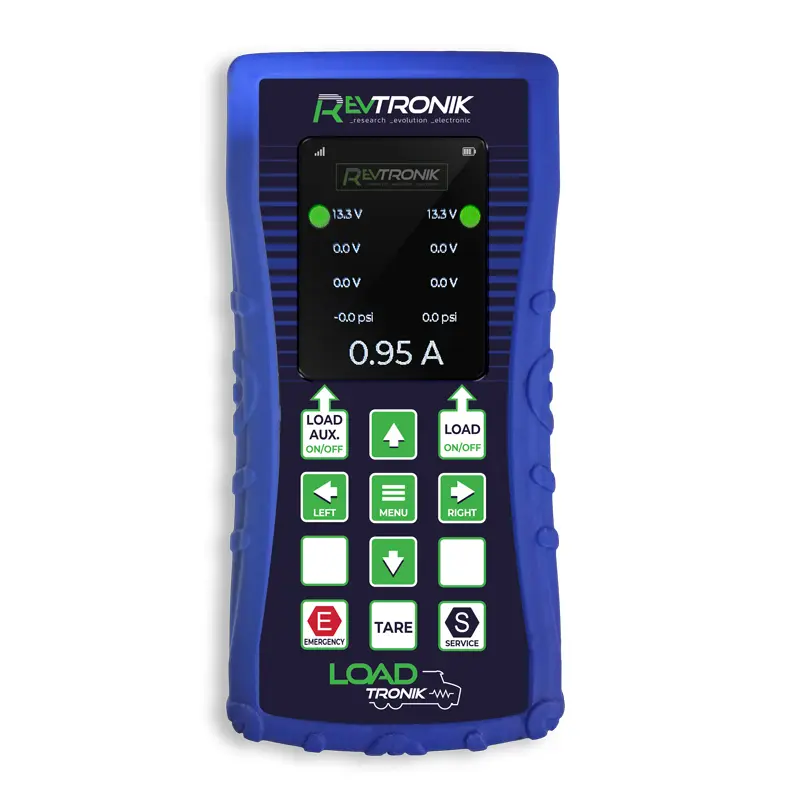
The LoadTRONIK LD1-G ships with a wireless remote control that shares the same proven wireless technology platform used in Revtronik's highly regarded TestTRONIK series — a product with thousands of units deployed in professional trucking operations across North America. Technicians who have used the TestTRONIK remote consistently report that it fundamentally changes how they work, enabling faster, more accurate, and completely solo diagnostic sessions.
11.1 REMOTE FUNCTIONS
The wireless remote provides full control over all active LoadTRONIK functions:
| Remote Function | Button | Action | When to Use |
| Auxiliary Load (Blue Wire) | LOAD AUX | Activates / deactivates the electrical overload on the blue wire only. | Use to test the blue wire circuit independently before enabling the full overload. |
| Full Circuit Load | LOAD | Activates / deactivates the current overload across all active circuits. | Use during full electrical system stress-testing. |
| Emergency Brake Circuit | EMERG | Opens / closes the Emergency (supply) air circuit — releases trailer spring brakes. | Use during brake stroke and slack adjuster inspection (pneumatic series mode required). |
| Service Brake Circuit | SERVICE | Activates / deactivates the Service (control) air circuit — applies / releases service brakes. | Use during brake stroke inspection; observe chamber movement and measure actuation pressure. |
| Menu / Navigation | UP / DOWN / ENTER | Navigate the remote's LCD menu and view diagnostic data. | Use to toggle between voltage/current display modes, view circuit status, and review pressure readings. |
11.2 REMOTE DISPLAY
The wireless remote's full-colour LCD screen mirrors the data shown on the main unit, allowing the technician to see all diagnostic information from under the trailer or alongside the rig — without returning to the device. Air pressure (digital), voltage, current, and circuit status are all visible in real time on the remote screen.
11.3 TESTTRONIK COMPATIBILITY
The LoadTRONIK LD1-G wireless system is developed on the same platform as the TestTRONIK — Revtronik's dedicated wireless trailer tester. Technicians already familiar with the TestTRONIK remote interface will find the LD1-G remote immediately intuitive.
 12. SAFETY WARNINGS & IMPORTANT NOTICES
12.1 WELDING OPERATIONS — MANDATORY DISCONNECTION
 CRITICAL WARNING: DO NOT USE THE LOADTRONIK LD1-G WHILE WELDING OPERATIONS ARE BEING PERFORMED ON THE VEHICLE OR TRAILER.
Welding current passing through the trailer or vehicle frame can create an unintended current loop through the LoadTRONIK's electrical circuits, causing immediate and irreversible damage to the device's internal components. Before any welding work begins on any part of the vehicle or trailer:
-
- Disconnect all electrical cables from the LoadTRONIK.
- Pneumatic gladhand connections may remain in place during welding if needed.
12.2 ELECTRICAL FAILURE DURING PNEUMATIC SERIES OPERATION
IMPORTANT SAFETY NOTICE: When operating in pneumatic series mode, a loss of electrical power to the LoadTRONIK can cause the device's electrically controlled pneumatic valves to close, instantly removing air pressure from the trailer brake circuits. This represents a serious risk if a technician is positioned underneath the trailer.
To mitigate this risk, Revtronik strongly recommends the use of an external power supply adapter (sold separately) whenever the LoadTRONIK is operated in pneumatic series mode. The external supply ensures continuous power to the device's valve control circuits independent of the vehicle's electrical system quality.
12.3 THERMAL / FIRE HAZARD
OVERHEATING RISK: Continuous operation of the electrical overload beyond the 10-minute automatic cutoff limit, or placing the device on or near flammable materials, poses an overheating and fire risk.
Always operate the LoadTRONIK on a non-flammable, stable surface. Never leave the device unattended while the overload function is active. The 10-minute automatic safety shutdown is a protection mechanism — do not attempt to bypass it.
12.4 WHEEL CHOCKING
NON-NEGOTIABLE: Wheel chocks must be installed before any pneumatic test — standalone or series mode. There are no exceptions.
12.5 AUTHORIZED USE ONLY
The LoadTRONIK LD1-G is designed for use by trained commercial vehicle technicians and mechanics familiar with North American heavy-duty vehicle electrical and air brake systems. Improper use by unqualified personnel may result in equipment damage, vehicle damage, or personal injury. Revtronik Inc. disclaims all liability for damages resulting from misuse, modification, or operation by unqualified individuals.
13. WARRANTY
13.1 STANDARD LIMITED WARRANTY
The LoadTRONIK LD1-G is covered by Revtronik's Manufacturer's Limited Warranty for twelve (12) months from the original date of purchase, as evidenced by the original sales invoice. This warranty covers defects in materials and workmanship under normal use and service conditions.
13.2 EXTERNAL COMPONENTS — 90-DAY WARRANTY
External wear components are warranted separately for ninety (90) days from the date of purchase. External components include:
-
- Electrical cables and wiring harnesses
- Pneumatic hoses and tubing
- Gladhands (air couplings) — including plastic housing
- Electrical connectors and terminal ends
- Analog pressure gauge indicators
- Pressure regulator(s)
13.3 WARRANTY SERVICE
Parts found to be defective within the applicable warranty period will be repaired or replaced at Revtronik's sole discretion. Revtronik reserves the right to replace the entire unit in lieu of a component-level repair.
13.4 WARRANTY EXCLUSIONS
This warranty does not cover:
-
- Damage caused by accidents, improper handling, or transportation incidents.
- Damage resulting from misuse, abuse, or unauthorized modification.
- Damage caused by welding current (see Section 12.1).
- Repairs performed by unauthorized service personnel.
- Normal wear and tear on external components beyond the 90-day component warranty period.
13.5 LIMITATION OF LIABILITY
This limited warranty supersedes and replaces all other warranties, express or implied, including implied warranties of merchantability or fitness for a particular purpose. Revtronik Inc. shall not be held liable for any indirect, incidental, special, or consequential damages arising from the use or inability to use this product, regardless of the cause or theory of liability.
• For warranty claims, technical support, and spare parts,
contact Revtronik Inc. at :
revtronik.com/contact
• View the full LoadTRONIK product line at :
revtronik.com/loadtronik
© 2025 Revtronik Inc. — All rights reserved.
Unauthorized reproduction prohibited.
Manual last update: 02/26