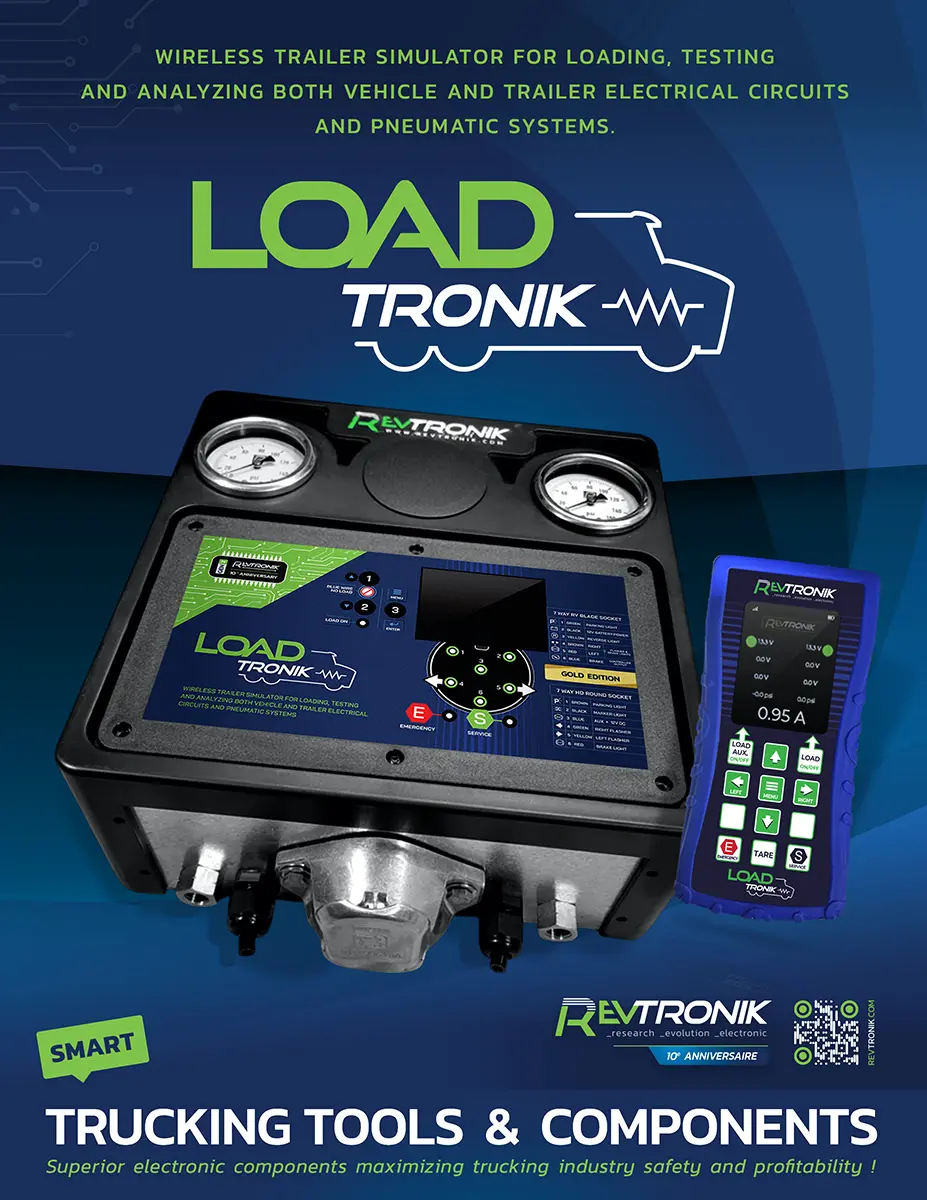







LOADTRONIK
LD1-G MANUAL (test_03)
& USER'S GUIDE


1. PRODUCT OVERVIEW
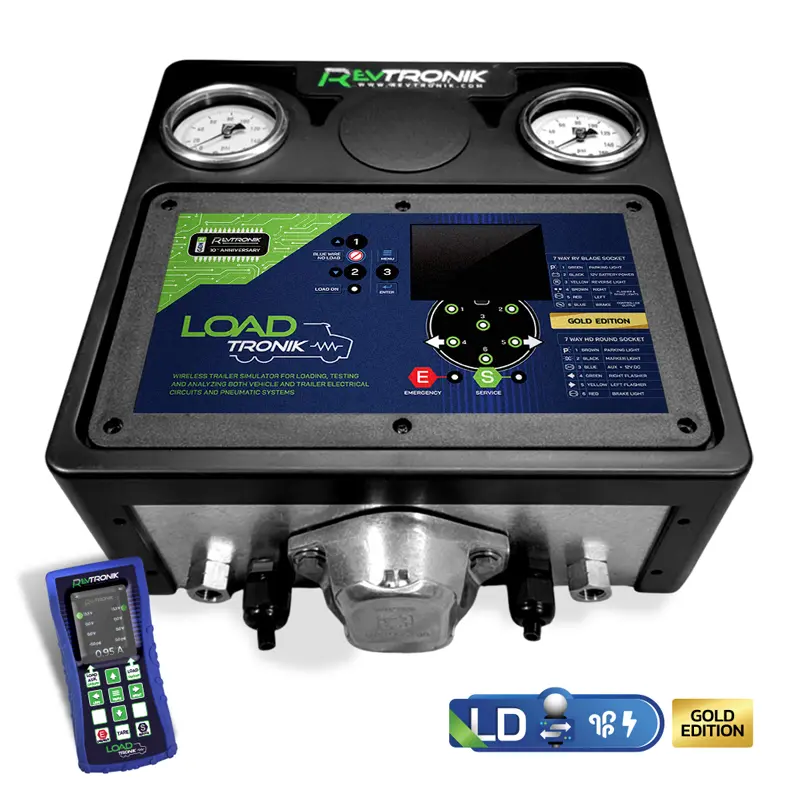
The LoadTRONIK LD1-G Gold Edition is Revtronik's top-of-the-line wireless trailer simulator, designed to charge, test, and analyze both the electrical circuits and pneumatic brake systems of Class 6–8 commercial vehicles — without requiring a physical trailer. Whether you are performing a scheduled PMI inspection, diagnosing an intermittent wiring fault, or completing a CVSA pre-trip check, the LD1-G gives a single technician everything they need, instantly, in the palm of their hand.
The Gold Edition is the only model in the LoadTRONIK lineup equipped with a full wireless remote control, allowing complete operation from anywhere around the truck or trailer. It supports in-series bidirectional operation between the tractor and trailer simultaneously, and it is the only edition capable of remotely controlling the pneumatic brake system while connected in series.
The LD1-G shares the same proven wireless platform as Revtronik's popular TestTRONIK series — devices that have sold thousands of units across North America. Technicians who use these tools simply cannot work without them.
Learn more about the full LoadTRONIK lineup: revtronik.com/loadtronik
LOADTRONIK EDITION COMPARISON
| Feature | LD1-G Gold | LD1-S Silver | LD1-B Bronze |
|---|---|---|---|
| Electrical load simulation (~8A) |  |
|
|
| Dual pneumatic gauges (Emergency + Service) | |
|
|
| Full-colour LCD display | |
|
 |
| Simultaneous voltage + current reading | |
|
|
| Wireless remote control | |
|
|
| Remote pneumatic brake control | |
|
|
| In-series bidirectional operation | |
|
|
| 7-pin round receptacle (SAE J560) | |
|
|
| 7-pin flat receptacle (domestic trailer adaptor compatible) | |
|
|
| 4/5-pin round adaptor compatible | |
|
|
2. CONTROL PANEL & INDICATOR REFERENCE
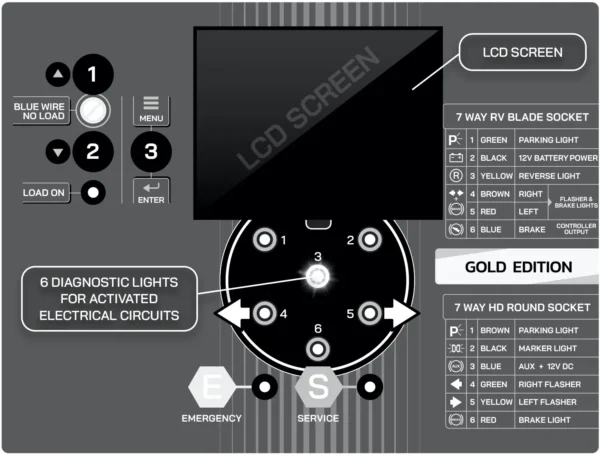
2.1 BUTTON & DISPLAY FUNCTIONS
| Button | Function | Description | Status Indicator |
|---|---|---|---|
| Button 1 | Blue wire overload toggle / Screen Up | Activates or deactivates the electrical overload on the blue wire circuit. Also scrolls UP through the LCD screen menu. | No Load light ON = blue wire isolated from overload (display power only). No Load light OFF = blue wire included in overload. |
| Button 2 | Enable current overload / Screen Down | Activates the ~8A current overload on all active circuits. Also scrolls DOWN through the LCD screen menu. | Overload active = current load applied to all circuits. |
| Button 3 (Enter/Menu) | Enter menu / Confirm selection | Enters the LCD configuration menu and confirms selections. Used to navigate language, backlight, sync settings, and firmware updates. | N/A — see LCD screen |
| LCD Display | Voltage / Current readout | Full-colour screen showing real-time voltage or current per circuit, depending on selected display mode. Also displays dot indicators for voltage quality. | Active when any circuit is energized or external power is connected. |
2.2 LED INDICATORS — 7-PIN ROUND RECEPTACLE (SAE J560 — HEAVY TRAILER)
| LED | Circuit | Description | Light On = ? |
|---|---|---|---|
| 1 | Signal Light | Clearance / marker light signal | Voltage present when circuit activated |
| 2 | Positioning Light | Tail / running / positioning light signal | Voltage present when circuit activated |
| 3 | Auxiliary / ABS | Auxiliary circuit or ABS module signal | Voltage present when circuit activated |
| 4 | Left Turn Signal | Left turn indicator | Voltage present when circuit activated |
| 5 | Right Turn Signal | Right turn indicator | Voltage present when circuit activated |
| 6 | Brake Light | Stop lamp / brake light signal | Voltage present when circuit activated |
2.3 LED INDICATORS — 7-PIN FLAT CONNECTOR*
*OPTIONAL DOMESTIC TRAILER ADAPTOR
| LED | Circuit | Description | Light On = ? |
|---|---|---|---|
| 1 | Signal Light | Clearance / marker light signal | Voltage present when circuit activated |
| 2 | 12-Volt Power | 12V auxiliary / battery power circuit | Voltage present when circuit activated |
| 3 | Reversing Light | Reverse / backup light signal | Voltage present when circuit activated |
| 4 | Left Turn + Brake | Left turn signal and brake light (combined) | Voltage present when circuit activated |
| 5 | Right Turn + Brake | Right turn signal and brake light (combined) | Voltage present when circuit activated |
| 6 | Electric Brake System | Electric brake controller signal | Voltage present when circuit activated |
3. TECHNICAL SPECIFICATIONS
| Parameter | Value |
|---|---|
| Current reading precision | 0.01 Amp |
| Maximum current per circuit | 20 Amps |
| Voltage reading precision | 0.01 Volt |
| Maximum voltage per circuit | 18 Volts |
| Simulated load current | ~8 Amps per activation |
| Maximum continuous overload duration | 10 minutes (thermal cutoff) |
| Operating voltage range | 9–16V DC (12V nominal) |
| Dot indicator — Green | 11–14V (normal range) |
| Dot indicator — Yellow | Below 11V (low voltage) |
| Dot indicator — White | Non-constant / pulsed signal (turn signals) |
| Pneumatic gauge — Emergency (red) | Dedicated dial — brake disengagement pressure |
| Pneumatic gauge — Service (blue) | Dedicated dial — service brake application pressure |
| Standards reference | SAE J560, FMCSS Part 393, CVSA blue wire standard |
4. BOX CONTENTS & CONNECTOR REFERENCE
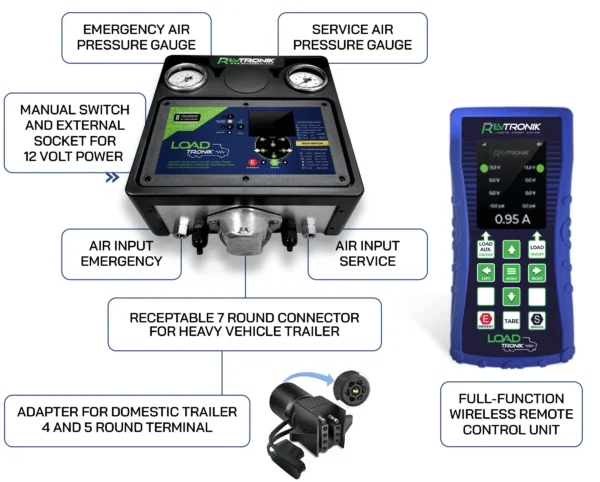
THE LD1-G GOLD EDITION IS SHIPPED WITH THE FOLLOWING COMPONENTS:
- 1x Ld1-G Main Unit (dual Electric-Pneumatic)
- 1x Wireless LD-GOLD Remote Control
- 1x 7-Pin Round Sae J560 Heavy Truck Connector (male)
- 1x 7-Pin Standard Wires
- 2x Pneumatic Air Gladhands Full Air Kit. (Red/Emergency • Blue/Service)
- Online Manual Access
AVAILABLE OPTIONAL COMPONENTS:
- 4 and 5 Round Terminal - Optional Adapter for Domestic Trailers.
- 7-pin flat - Optional Adaptor for Domestic Trailer Connectors.
- 1x Wireless Remote Control.
- 1x External Power Supply Wires - Optional Display Power.
5. OPERATING
[IMAGE-JF — LD1-G in use — connected to tractor 7-pin receptacle in service bay]
The LoadTRONIK LD1-G allows you to simulate a current load on your vehicle's electrical wiring even when no trailer is available. The average simulated current load is approximately 8 amps. With the LD1-G, you can simultaneously see the current draw and voltage of each activated circuit, identify which circuits are live, and detect whether any wires are contacting each other — all via the LED indicators and the full-colour LCD screen on the unit.
In the pneumatic version, the integrated dual-dial gauges allow you to read the actual air pressure being sent by the vehicle. You have one dedicated dial for the Emergency circuit (brake disengagement) and one for the Service circuit (brake application). For even greater precision, the wireless remote control screen provides a live digital pressure readout directly in your hand.
The LD1-G Gold Edition is the most capable device in the LoadTRONIK lineup. It can be used standalone on the vehicle, or in series between the vehicle and a connected trailer. External voltage source connection is also possible via optional adapters, allowing the display to remain powered independently of the vehicle's electrical system.
The Gold Edition's wireless remote control lets you perform all of the above functions remotely — see the voltage, current, and air pressure data directly in your hand, apply the electrical load, and control the pneumatic brake system remotely — all without a second technician.
6. TURNING ON THE SCREEN
To activate the LD1-G, simply energize any electrical circuit on your vehicle. The screen will light up automatically and display the current or voltage, depending on the mode you have selected. There is no dedicated power button — the display wakes the moment a circuit is live.
Alternatively, the optional external power wires allow you to connect the LD1-G to a vehicle battery, an external shop battery, or an automotive accessory socket to power the display only. When using external power, that wire is used exclusively to power the display — no current overload will be applied to it, and its voltage is fully isolated from the vehicle diagnostic circuit.
6.1 VIA 7-PIN ROUND RECEPTACLE (SAE J560 — HEAVY TRUCK)
[IMAGE-JF — 7-pin round SAE J560 plug connected to tractor receptacle]
Turn the ignition key to the ON position or start the engine. You should immediately see voltage on the blue wire (constant auxiliary power), which will light up the blue wire LED and activate the LCD screen. This is standard practice for all Class 6–8 heavy trucks.
If no voltage appears on the blue wire when the ignition is on, your vehicle may be using a manual switch on the blue wire. This configuration is technically non-compliant with the industry standard for constant auxiliary power, but it is common. In that case, simply turn on the switch and the screen will light up.
6.2 VIA 7-PIN FLAT CONNECTOR OR 4/5-PIN ROUND TOW ADAPTORS (STANDARD VEHICLES)
[IMAGE-JF — 7-pin flat connector and optional 4/5-pin round tow adaptor]
The LD1-G has been designed primarily to the electrical standards of heavy vehicles and adapted for standard vehicles. For standard vehicles using a 7-pin flat connector or optional round tow adaptors, if no voltage appears on the blue wire when the ignition is switched on, power the display from the parking lights (brown wire).
Note that when powered via the parking light circuit, the current overload will be divided between the brown wire and any additional circuits you activate. Keep this in mind when interpreting current readings during overload testing.
6.3 VIA EXTERNAL POWER SUPPLY (OPTIONAL)
[IMAGE-JF — External 12V battery connection to LD1-G optional power input]
Connect the optional external power wires to a 12V vehicle battery, portable jump pack, or automotive accessory socket. The display will activate independently of any vehicle circuit. This method is strongly recommended when operating in pneumatic series mode, as it protects the technician if vehicle electrical connections become unstable during testing.
7. ACTIVATING THE CURRENT OVERLOAD
[IMAGE-JF — LD1-G overload activation — Button 1 and Button 2 highlighted on unit]
7.1 BLUE WIRE ISOLATION (NO-LOAD MODE)
By default, when the LD1-G activates, the No Load light below Button 1 is illuminated. In this state, the blue wire is used solely to power the display — its voltage is not subjected to the current overload. This is intentional: the blue wire is the CVSA constant auxiliary power circuit, and isolating it from the load ensures you can monitor its voltage quality without creating an artificial load on it.
To include the blue wire in the overload test, press Button 1 to turn off the No Load light. The blue wire will now receive the same ~8A overload as all other active circuits when you press Button 2.
7.2 ENABLING THE CURRENT OVERLOAD
Press Button 2 to activate the current overload. The simulated load of approximately 8 amps will be applied to all currently active circuits simultaneously. Observe the following on the LCD screen:
- Voltage per circuit — a healthy circuit should hold between -?- 11 and 14 volts under load (green dot)
- Current draw — should reflect a realistic trailer load of approximately -?- 8 amps
- LED indicators — confirm all expected circuits are energized
If the voltage drops significantly under load (yellow dot, below -?- 11V), investigate:
- Corroded or loose connector pins at the 7-pin plug
- Undersized or damaged wiring in the vehicle's trailer harness
- Poor chassis ground connections at the frame or junction block
- High resistance at splices or connections near brake chambers
7.3 MAXIMUM ACTIVATION TIME — 10-MINUTE THERMAL PROTECTION
To protect both the user and the internal components of the LD1-G, the device limits continuous overload operation to a maximum of 10 consecutive minutes. When this threshold is reached:
- The power light begins flashing
- The unit automatically disables the overload
- Normal display operation continues unaffected
To re-enable the overload after automatic cutoff: turn off the activated circuit, wait briefly for the unit to cool, then re-energize the circuit and press Button 2 again.
8. USING THE PNEUMATIC GAUGE
[IMAGE-JF — LD1-G pneumatic gauges — red Emergency dial and blue Service dial with gladhands connected]
Connect the vehicle's red air gladhand to the LD1-G's red gladhand inlet, and the vehicle's blue air gladhand to the blue gladhand inlet. Once connected, the integrated pneumatic dials will immediately display the actual air pressure being delivered by the vehicle's air system.
The red dial (Emergency circuit) shows the pressure used to disengage the spring brakes. The blue dial (Service circuit) shows the pressure applied to the service brakes when the foot valve is activated.
8.1 PRESSURE DISCREPANCY DIAGNOSIS
The purpose of the LD1-G pneumatic gauges is to confirm that the pressure shown on the vehicle's dashboard gauges actually matches the real pressure being delivered to the trailer gladhand connections. Discrepancies reveal hidden problems such as:
- Manual brake deactivation valves that are partially closed
- Foot valve restrictions that limit pressure delivery under the trailer
- Damaged or kinked air lines between the tractor frame and the gladhands
- Governor or protection valve malfunctions reducing delivered pressure
8.2 AIR LEAK TEST — FMCSS PART 393 REFERENCE THRESHOLDS
The LD1-G can be used as a trailer substitute to perform a complete air leak test on the tractor's pneumatic system. Build the system to governor cut-out pressure (~120–125 PSI), apply the parking brake, shut down the engine, and monitor pressure drop over one minute:
| Pressure Loss (PSI/min) -?- | Classification | Required Action |
|---|---|---|
| 3 PSI/min or less | Normal — acceptable | Vehicle is road-ready. Document and continue inspection. |
| 4–6 PSI/min | Minor leak — monitor | Schedule repair. Vehicle may continue operating pending repair. |
| More than 6 PSI/min | Major leak — out of service | Vehicle must not return to road until leak is repaired. FMCSS Part 393 violation. |
9. ADDITIONAL LCD SCREEN DIAGNOSTICS
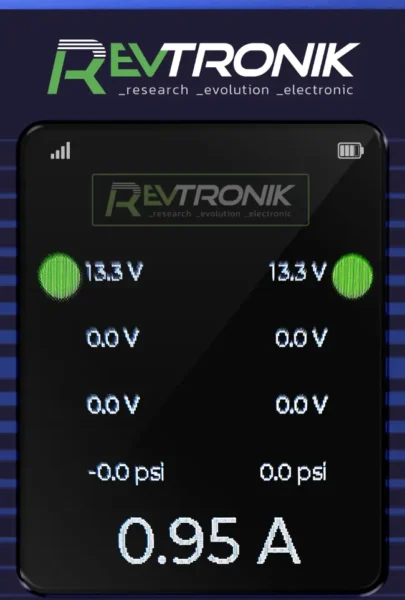 The LD1-G full-colour LCD screen displays real-time voltage on each active circuit, as well as the total current consumed by all active circuits simultaneously. This level of detail is not available on the Bronze Edition, which has no colour screen.
One particularly useful capability of the LCD screen is voltage leak detection. A vehicle may have a small voltage leakage on a circuit — too low to illuminate the LED indicators, but clearly visible on the screen. This allows you to detect cross-talk between wires, parasitic draw from trailer accessories, or backfeed through corroded grounds, before they cause real-world problems.
9.1 DOT COLOUR SYSTEM — VOLTAGE QUALITY INDICATORS
| Dot Colour | Voltage Condition | Meaning |
|---|---|---|
 Green Green |
11–14V (normal) | Circuit is healthy. Voltage under load is within acceptable limits for commercial trailer wiring. |
 Yellow Yellow |
Below 11V (low) | Voltage has dropped below threshold under load. Investigate connectors, grounds, and wiring. Indicates excessive resistance in the circuit. |
 White White |
Non-constant / pulsed | Represents turn signals or other switching circuits. Displays the lowest and highest average voltage across the on/off cycle. Not a fault condition. |
10. USING THE LD1-G IN SERIES — ELECTRICAL
 The LD1-G Gold Edition allows you to connect your vehicle to the LoadTRONIK and then connect the LoadTRONIK to the trailer simultaneously. The goal is to see, in real time, the voltage being delivered to the trailer and the current consumption of the trailer — quickly and without any intrusive wiring work.
There is no need to open wire conduits, strip wires, build bypass harnesses, or use a multimeter with test leads. Simply plug the LD1-G in series between the tractor and trailer, and every circuit is visible on the screen immediately.
10.1 ISOLATING TRACTOR VS. TRAILER FAULTS
The series connection is the most definitive method for determining whether an electrical problem originates in the tractor or the trailer:
- Test the tractor alone first — connect the LD1-G only (no trailer). Apply the overload. If readings are normal, the tractor wiring is good.
- Connect the trailer — if a fault reappears (blown fuse, voltage collapse, tripped breaker), the fault is in the trailer.
- Key insight: if the trailer has a specific problem such as a short circuit, it will not show up on the LD1-G with the overload method alone. It will only appear when the actual trailer is reconnected — which is the clearest possible confirmation that the fault is in the trailer, not the tractor.
You can also combine the electrical overload with the trailer's natural current draw to stress-test the vehicle's connections under maximum realistic load. This reveals marginal connections that would otherwise pass a standard voltage test.
11. USING THE LD1-G IN SERIES — PNEUMATIC
 IMPORTANT SAFETY: IT IS ESSENTIAL TO INSTALL WHEEL CHOCKS UNDER THE TIRES BEFORE PERFORMING ANY PNEUMATIC SERIES CHECK. BRAKES MAY BE ENGAGED OR RELEASED DURING THIS PROCEDURE.
With the LD1-G Gold Edition, you can use the device in series between the vehicle and the trailer — both electrically and pneumatically — simultaneously. This means you can not only read the air pressure being sent to the trailer in real time, but you can also control it remotely via the wireless remote control.
Simply connect the tractor's gladhands to the vehicle-side ports of the LD1-G, and connect the LD1-G's trailer-side ports to the trailer's gladhands. With the wireless remote control in hand, you can now:
- Remotely activate the emergency brake disengagement (spring brake release)
- Remotely activate the service brake engagement (brake application)
- Read the live air pressure on the remote control screen from anywhere around the trailer
This means one technician can go under the trailer to observe and measure brake chamber stroke, slack adjuster movement, and brake lining contact — while simultaneously controlling the brake application remotely. No second technician needed in the cab.
All results — air pressure, brake status, electrical readings — are visible live on the wireless remote control screen in the palm of your hand.
11.1 CONNECTION PROCEDURE — PNEUMATIC SERIES -?-
[IMAGE-JF — Step-by-step pneumatic series connection diagram]
IMPORTANT SAFETY: IT IS ESSENTIAL TO INSTALL WHEEL CHOCKS UNDER THE TIRES BEFORE PERFORMING THIS TYPE OF CHECK.- Install wheel chocks under all tires before proceeding.
- Connect the vehicle's red gladhand (Emergency) to the LD1-G's red gladhand inlet (vehicle side).
- Connect the vehicle's blue gladhand (Service) to the LD1-G's blue gladhand inlet (vehicle side).
- Connect the LD1-G's trailer-side red gladhand outlet to the trailer's red gladhand.
- Connect the LD1-G's trailer-side blue gladhand outlet to the trailer's blue gladhand.
- Connect the LD1-G electrically to the tractor's 7-pin receptacle.
- Power the LD1-G display via external power source (strongly recommended for pneumatic series mode — see Section 6.3 and Section 14.2).
- Synchronize the wireless remote control if not already paired (see Section 12.2).
- The remote control screen will display live air pressure readings. You are now ready to perform remote brake control diagnostics.
11.2 REMOTE PNEUMATIC CONTROL — OPERATING IN SERIES
With the device connected in pneumatic series, use the wireless remote control to:
- Remotely disengage the emergency (spring) brakes — allows you to observe brake chamber retraction from under the trailer.
- Remotely apply the service brakes — allows you to observe brake chamber extension, slack adjuster travel, and lining contact from under the trailer.
You can go under the trailer, see and analyze the movement of the trailer brakes with one technician. No need for a second mechanic to operate the brakes from the cab. Air pressure readings are displayed live on the remote control screen throughout the procedure.
ALL RESULTS — LIVE IN YOUR WIRELESS REMOTE CONTROL SCREEN.
12. WIRELESS REMOTE CONTROL
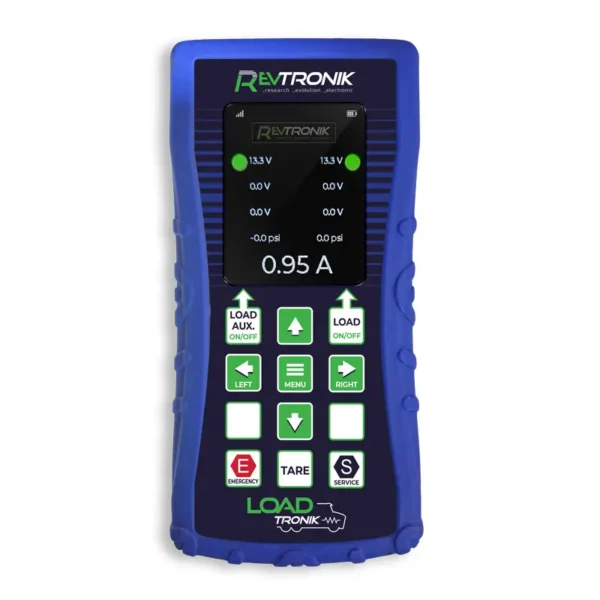 The LoadTRONIK LD1-G uses the same wireless technology as Revtronik's popular TestTRONIK series of remote-controlled trailer diagnostic devices — a platform that has sold thousands of units across North America. Technicians who adopt these tools consistently report that they cannot imagine working without them.
The wireless remote control gives technicians complete operational flexibility. They can perform the entire diagnostic sequence independently — no assistant required — and see all results directly in their hand.
12.1 REMOTE CONTROL FUNCTIONS
From the remote control, you can activate the following functions remotely:
- Additional current load on the blue wire (Load AUX)
- Current load on all active wires (LOAD)
- Emergency brake system valve activation (pneumatic series mode)
- Service brake system valve activation (pneumatic series mode)
- Full control of all LD1-G functions
The remote control screen displays live voltage, current, and air pressure data — the same information shown on the LD1-G unit itself — directly in your hand from anywhere around the vehicle.
12.2 WIRELESS SYNCHRONIZATION PROCEDURE
[IMAGE-JF — LD1-G sync procedure — remote and device screens showing synchronization menu]
The new full-colour screens provide richer menu navigation than previous generations. All configuration, including synchronization, now passes through the menu system. No more button combinations.
Remote control — steps:
- Press the Menu button on the remote control.
- On the first screen, select LoadTRONIK Configuration, then press Menu to confirm.
- Select Remote Synchronization.
LD1-G device — steps:
- Press the Menu button on the LD1-G unit.
- On the first screen, select Configuration, then press Menu to confirm.
- Select Synchronization.
- The screen will display the channel selection and enter synchronization mode.
- Wait until the screen confirms Synchronization Done — the remote and unit are now paired.
12.3 MENU OPTIONS
From the Menu button, you can customize a wide range of settings including:
- Screen backlight intensity
- Display language
- Remote control name / identification
- Firmware updates
- Channel configuration
If you have a specific need not covered in the menu, contact Revtronik directly: revtronik.com/contact
 13. WARRANTY
The LoadTRONIK LD1-G is covered by the Manufacturer's Warranty for twelve (12) months from the date of purchase, as evidenced by the original invoice, against any defect in materials or workmanship under normal use conditions.
13.1 EXTERNAL COMPONENTS — 90-DAY COVERAGE
External components of the device are warranted for ninety (90) days from the date of purchase. These components are subject to regular handling and may be inadvertently damaged through normal use. External components include:
- Electrical cables
- Pneumatic hoses
- Air gladhands (plastic bodies and air connections)
- Electrical wires and connectors
- Pressure indicators / analog gauges
- Pressure regulator
13.2 WARRANTY TERMS & EXCLUSIONS
Parts found to be defective during the warranty period will be replaced or repaired at the manufacturer's sole discretion. The manufacturer reserves the right to replace the entire device. This warranty does not cover:
- Breakdowns caused by accidents or damage during transportation
- Damage resulting from improper handling, misuse, or operation outside specified parameters
- Repairs or modifications performed by unauthorized persons
- Damage caused by welding operations while the device is electrically connected (see Section 14)
This limited warranty supersedes and is in lieu of all other warranties, express or implied, including warranties of merchantability or fitness for a particular purpose. The manufacturer cannot be held liable for indirect damages, regardless of the cause.
For warranty claims or product support, contact Revtronik: revtronik.com/contact
14. SAFETY WARNINGS
14.1 WELDING OPERATIONS
14.2 ELECTRICAL FAILURE DURING PNEUMATIC TESTING
14.3 WHEEL CHOCKING — MANDATORY FOR PNEUMATIC TESTING
14.4 MAXIMUM OVERLOAD DURATION

© 2026 Revtronik Inc. — All rights reserved.
Unauthorized reproduction prohibited.
Manual last update: 02/26
LoadTRONIK LD1-G — User Manual | © 2026 Revtronik inc. | revtronik.com